Repeats
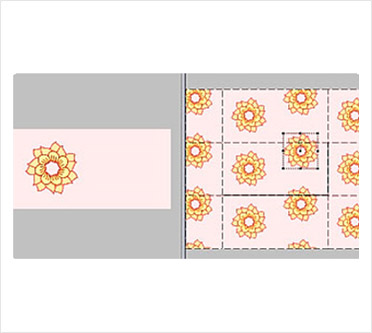
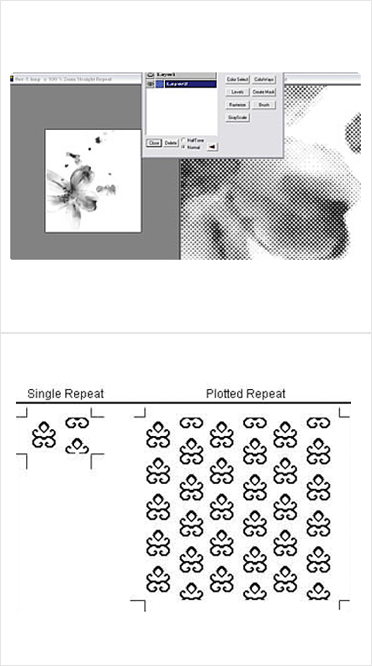
Textiles specific repeat format such as straight, cross & brick with facility to manipulate drop factor. This function instantly displays multiple units of the current design, thus it highlights how well the design merges along its outer edges when it would be finally printed. The Joint lines show up immediately, which can be edited in our Painter module.
Minimum Repeats
Effortlessly setting actual design repeats from sketch form. Computers as a standard process designs in a rectangular format, and artists normally create the design in a random fashion, since they have to take care that the forms are not cut along the edges. Minimum Repeat is an automized function to instantly convert a sketch from an artist to a rectangular format.
In-Out Repeat
Reorients the repeats so as not to cut major motifs, in case of design to be exposed on Step & Repeat machine. This essentially is opposite to the Minimum repeat function, very necessary for printing separation.
Set Repeats Size
This allows you to define the repeat size to suit the equipment available. The design is proportionately adjusted in both directions flawlessly.
Features
Color Reduction
Automatic and user selectable color reduction facility with unique Dithering techniques. An important feature to reduce the scanned image with infinite colors to printable number of colors for any and every artwork. The artwork in Flat, Stippling, Halftone or Textured format can be reduced to required number of colors in fraction of a second with ease. This is the heart and soul of Design Studio, Deep research and extensive testing on a wide range to design styles has been done. The wonder is that the Algorithms take care in maintaining unflinching details from the original scanned image to the reduced design.
Dynamic Repeat Tool
This is a unique tool that allows changing of the origin of a selected area of the design.
Advanced Color Reduction
Image colors managed in statistical manner of %age usage, or Family Color usage gives better control in replacing shades used less with similar colors used more often.
The Color reduction techniques are sometimes incapable of handling complex image types. With the advanced color reduction technique the user has the freedom to: Selectively choose separate areas and use the process of Color reduction discreetly - Area Mask.
Selectively work on a range of shades to do color reduction in desired color - Color Mask.
Auto Color Ways
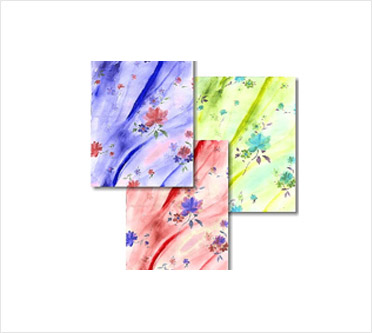
Facility to automatically generate infinite color ways of a selected region with the ease to individually handle the Color, Tint and Tones of the image. These can be printed on paper for presentation and merchandising. This marvelous feature, which removes the trial and error generally done in the print house by doing color strike offs on actual fabric.
Auto Outline
Extensive Controls provided for system to automatically generate outline on selectable hard areas of an image, with user selectable colors and thickness.
Spot Color Separation
Instant generation of spot color separation of the final design for screen making. With all the requirements which manually would have taken a long time.
Separation Printing
Facility to print separations of the design on gateway paper or film taking into account the overlapping shades of the same color and auto trapping on A0 size plotter with crop mark.
Merging Separations
Creating designs by merging color separations of the same or different designs is possible with Design Studio. This opens up an amazing feature of creating new designs for permutation and combination methodology.
Plotting
The last but critical task of designing i.e. of plotting is executed with ease and accuracy. Of course the vital elements of merging and trapping of color separation are the key to this feature Plotting.
Online Repeats
Allow you to edit the design online and see the impact of the changes online. The system also permits you to visualize various types of repeats setting and select the one so desired.
Scanning
Twain compliant true color scanning. Facility within the scanning module whereby user can preview and modify, brightness contrast, Hue balance, etc. This powerful module ensures that we get a good scanned image to process on, which is very important to improve efficiency of the subsequent processes.
Color Palette Management
RGB, HSV, CMYK color specification supported. PANTONE Textile Color Specifier is built in Design Studio to cater to Exporters needs. Versatility has been provided wherein user can define his own palettes according to the season colors and printable shades in his industry.
Color Charts
Textronics Color Specifier is an elaborate gamut of colors printed on paper i.e. all REDS, GREENS, BLUE, etc along with the HSV values ensures accuracy in specifying colors in the art work.
Selection Tools
Free hand, Geometrical selection, magic wand, and chroma mask facility provided, for selecting and manipulating forms to be easily edited, copied, deleted or other areas.
Out-line Tools
Pencil Paintbrush, etc provided for drawing & painting images directly on screen. An extensive array of functionality such as Clone tool, Pattern fill, Magic wand, magic fill, gradient fill, bezier tool etc and brush styles are available to either create designs or touch up the joint lines created during repeat setting.
Out-line Brush
Is a strong facility to draw outline with accuracy & symmetry, it is so simple that you have to select a color, required thickness for your outline & then just with a single click of your mouse/pen on desired color of your image you can draw a outline.
Clip Book
This facility will allow you to save the objects for ready to use.
Fabric Simulation
The System is capable of simulating a true simulation of both the face and back view of the design for all types of fabrics-Single, double, wadded, Treble, Extra Weft using different counts & thickness of yarn and ends & picks/inch setting same can be printed on color printer.
Unlimited Undo
This Automatic facility provides user to undo single or multiple actions while editing, creating a new design, colour reducing or making framework.
Zoom Manager
Advanced dialog box for managing Zoom-in/Zoom-out image. Miniature representation of image -Thumbnails of the design is provided for instant navigation to the exact location of the design during viewing or editing.
Wall Paper
Display of designs on entire Screen allowing user to see design in repetitive form. This provides us with a preview of the Artwork and shows whether the design blends harmoniously when it will be finally printed.
Thumb Nails
For user to browse through the preview of design from the library, before actual recall. Saves time, by easily selecting desired design for editing/viewing.
Multi Document
Facility to display multiple designs /colorways of any design simultaneously.
Design Printing
Color Printing facility according to user-defined size and color to match closely with screen representation. The printout can be either with straight line or with pinking shear effect. Colors used in the design can be printed along with.
Print Preview
A preview of the designs & separations on screen before printing on paper gives a brief idea of the final print out before actually printing it.
Library
Forms library feature for creation of new designs by combining different motifs.
Help
On-line & Context Sensitive help feature. On-line & Context Sensitive help feature.